
Recently, I tested Bluehost’s new AI website builder to see if it could really create a professional website without coding.
I used it to create a website for my YouTube brand, Sumit Sao Reviews.
To be honest, I didn’t like the first design it generated. But when I asked the AI to redesign my website using another prompt, the result surprised me.
There are some features I really liked. But there are also a few limitations that Bluehost needs to fix.
So, is it worth your money?
In this review, I’ll share my personal experience, pros and cons, pricing, and whether you should use it in 2026.
Affiliate Disclosure: This review is sponsored by Bluehost. I earn affiliate commission from qualified purchases made through links on this site. I only recommend product & services that I personally used or researched. Thank you for your support. Learn more
Is Bluehost AI Builder Worth It? (Quick Verdict)
Yes, Bluehost AI Builder is worth trying if you want to create a website or web application without coding.
You can create, customize, and publish your website for free without providing your credit card details.
I really liked its AI editing feature.
But the lack of source-code export, limited AI credits, and missing backup options are a few things I didn’t like.
| Product Name | Bluehost AI Builder |
| Best for | Beginners, creators and small businesses |
| Free plan | Yes (Get Free Account) |
| Credit card required | No |
| Starting price | $20/month |
| Coding skills required | No |
| Website and web app creation | Yes |
| Free hosting | Yes |
| Custom domain | Paid plans only |
| Customer support | 24/7 |
| Source-code export | No |
What Is Bluehost AI Builder?
Bluehost AI Builder is a no-code AI website and web application builder that allows you to create and customize websites using simple text prompts.
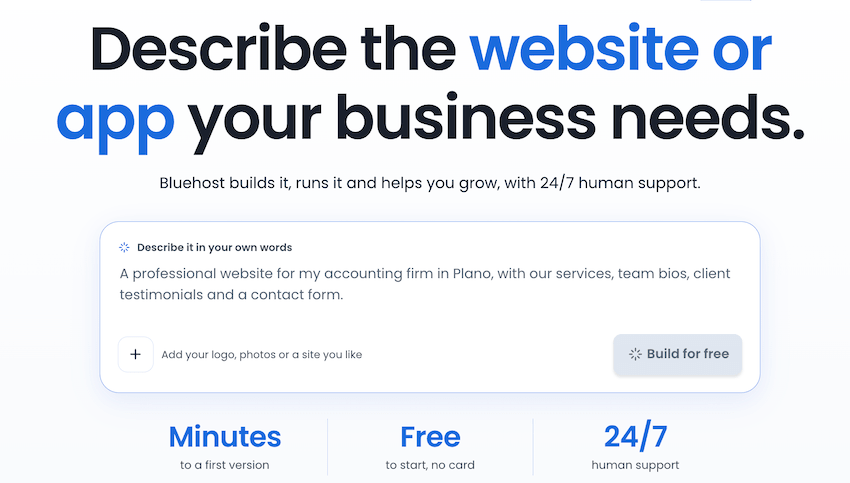
For example, suppose you want to create a website for your photography business.
You can simply explain what pages, sections, and features you want on your website, and the AI will create it for you.
Here are a few things you can create using this tool:
- Business websites
- Landing pages
- Personal portfolios
- Appointment booking systems
- Interactive calculators
- Online directories
- Customer portals
- Business dashboards
The good thing is that you don’t need to purchase web hosting separately.
Quick NOTE: Bluehost AI Builder is different from Bluehost’s WordPress AI website builder. Don’t get confused between these two products.
My Personal Experience With Bluehost AI Builder
I wanted to create a website where I could showcase my YouTube videos, share my blogging journey, and recommend the tools I use in my business.
So, I decided to create this website using Bluehost’s AI builder.
You can watch my complete video below to see how I created it from scratch.
How Good Was the First Website It Created?
I wrote a prompt explaining my website requirements, uploaded my photo and website logo, and added links to some of my YouTube videos.
Within a few minutes, it created all four pages that I requested:
- Home
- About Me
- Tools I Use
- Contact Us
What impressed me the most was that it successfully fetched the titles, thumbnails, and descriptions of my YouTube videos.
It even added a working link to my YouTube channel.

But my website logo was too small, and the overall design looked very basic.
So, I decided to test its AI customization feature.
Can It Redesign an Entire Website Using a Single Prompt?
Yes, you can ask the AI to completely redesign your website using a single text prompt.
First, I asked it to increase the size of my website logo, and it fixed the issue.
After that, I used a prompt similar to this:
Redesign my existing website from scratch. The current design looks too basic and generic. I want a premium, modern website that looks like I paid a top web design agency $10,000 to design it. Improve the layout, spacing, sections, cards, buttons, and overall design. Take inspiration from websites like Apple and Stripe.
And here’s what it created.

Just look at the difference between these two designs.
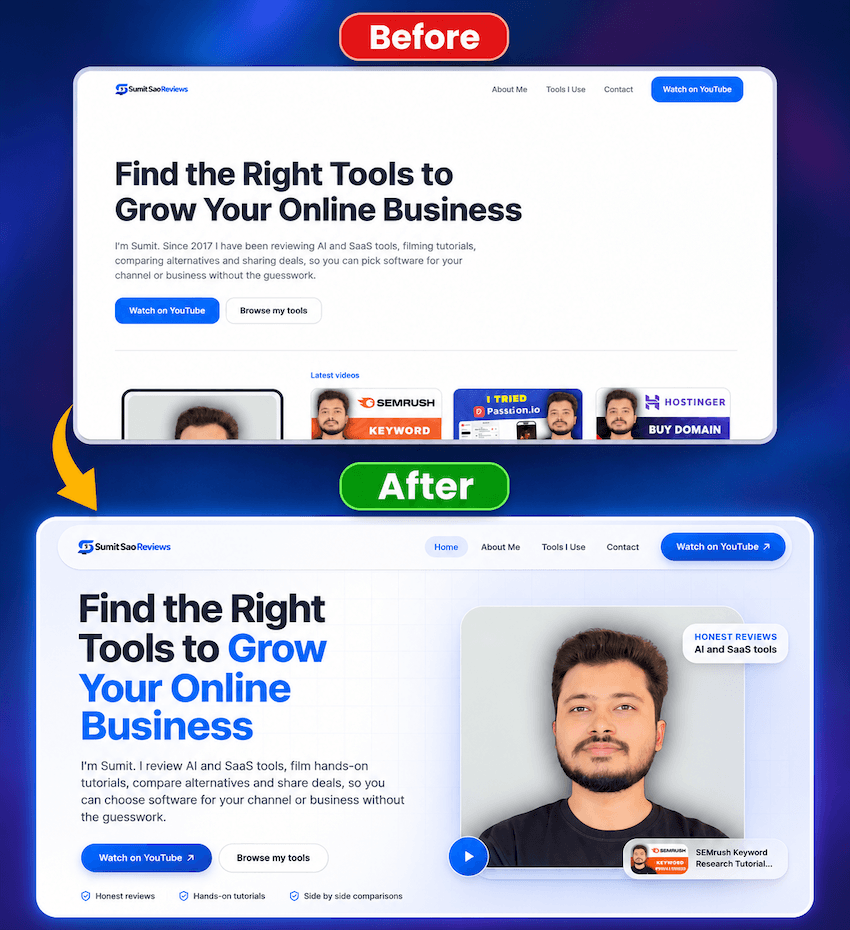
It improved almost every section of my website and even added some cool hover animations.
I also checked the mobile version, and it looked good in the mobile preview.
My Tip: If you’re not happy with the first design, simply ask the AI to redesign your website and explain what you don’t like about the current design.
It worked really well for me.
6 Best Features of Bluehost AI Builder
1. Create Websites Without Coding
You don’t need any coding or website design skills to use this tool.
Simply explain your requirements in plain English, and it will create the website for you.
You can even ask it to create multiple pages with different layouts and features.
2. Customize Your Website Using AI Prompts
This is my favorite feature.
Suppose you want to change your website’s background color, increase your logo size, add a new section, or change the entire layout.
Just tell the AI what you want to change.
3. Create Web Applications
Bluehost is not just limited to creating websites.
You can also create web applications with databases, user accounts, and admin dashboards.
For example, if you run a salon, you could create an appointment booking application where customers can request appointments and you can manage them from your dashboard.
I haven’t personally tested these advanced features yet, but other published demonstrations have shown similar applications.
4. Upload Your Own Images and Logo
You can upload your website logo, personal photos, product images, and other images while writing your prompt.
You can also mention your brand colors and preferred design style.
I tested this feature, and the AI successfully added both my photograph and website logo.
5. Multiple Websites and Free Hosting
There is no fixed limit on the number of projects you can create, even on the free plan.
Your main limitation is your AI credit allowance.
Another good thing is that your published websites remain online even if you run out of AI credits.
6. 24/7 Human Customer Support
Bluehost offers 24/7 human customer support for hosting, publishing, domains, billing, and other supported issues.
But don’t expect their support team to write custom code or fix complex application logic for you.
I haven’t personally contacted their support team for this tool yet.
Bluehost AI Builder Pros and Cons
| Pros 👍 | Cons |
| Free plan with no credit card required | Limited AI credits |
| Easy to use | Even failed builds can consume credits |
| No coding skills required | No source-code export |
| Create websites and web apps | No built-in undo button |
| Customize websites using text prompts | No built-in backup restoration |
| Hosting included on all plans | Free websites aren’t indexed by Google |
| Create multiple projects | No built-in payment processing |
| 24/7 human support | Possible slow loading after inactivity |
What Are the Biggest Drawbacks of Bluehost AI Builder?
Apart from the basic design I got during my first attempt, here are a few limitations I found while checking Bluehost’s official documentation.
1. Even Failed Builds Can Consume AI Credits
Whenever you ask the AI to create something or make changes to your website, it normally consumes one AI credit.
The problem is that even if the AI fails to make those changes, it can still consume a credit.
I hope Bluehost fixes this issue.
2. You Cannot Export Your Website’s Source Code
This is one of my biggest concerns.
Suppose you’ve created a website using this tool, and after two years, you want to move it to another hosting provider.
You cannot simply download your website’s source code and transfer it to another host.
As someone who has been blogging since 2017, I prefer having full control over my websites.
3. No Undo Button or Backup Restoration
Suppose you’re happy with your website, but the AI messes up its design while making a few changes.
Currently, there is no built-in undo button, version history, or backup restoration option.
You’ll have to ask the AI to fix the issue again.
This is a feature I would really like to see Bluehost add.
4. No Built-In Payment Processing
Bluehost’s standalone AI builder doesn’t currently offer built-in payment processing.
So, if you want to create an online store and accept payments from customers, I would suggest checking out Bluehost AI Store or another eCommerce platform.
5. Your Website May Load Slowly After Inactivity
While checking Bluehost’s official FAQs, I found something interesting.
Websites and applications go into sleep mode after 15 minutes of inactivity.
When someone visits your website again, it needs to wake up, which may result in a slower initial page load.
I haven’t personally tested its website loading speed yet.
6. You Need to Check AI-Generated Content
During my test, I asked the AI to create some sample testimonials to see how the testimonial section would look.
It created professional-looking testimonials, but they were fictional.
Make sure to replace such sample content with real information before publishing your website.
Is Bluehost AI Builder Really Free?
Yes, Bluehost offers a free plan that allows you to create, customize, and publish websites without providing your credit card details.
Here’s what you get with the free plan:
| Feature | Free plan |
| Daily AI credits | 5 |
| Maximum credits per 30 days | 30 |
| Website creation | Yes |
| Web application creation | Yes |
| Multiple projects | Yes |
| Free hosting | Yes |
| Free subdomain | Yes |
| Custom domain | No |
I used this free plan to create the website I showed you earlier.
So, if you just want to test this tool, there is no need to purchase a paid plan.
How Much Does Bluehost AI Builder Cost in 2026?
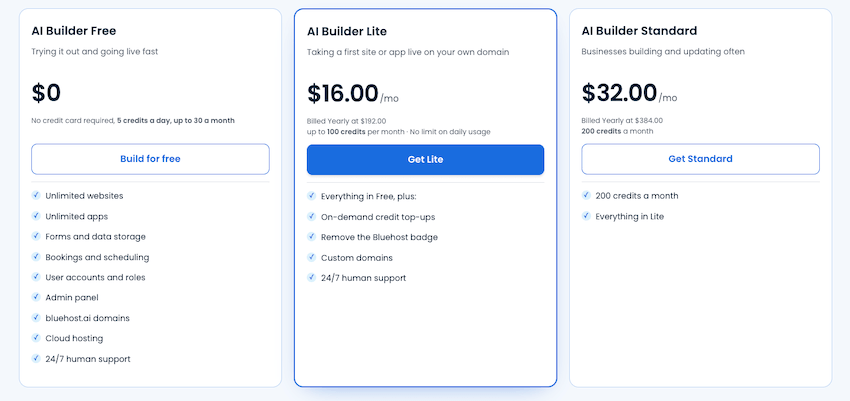
Bluehost offers three paid plans: Lite, Standard, and Pro.
Pricing starts at $20/month, and all paid plans allow you to connect your own domain name.
Here’s a comparison of all four plans:
| Features | Free | Lite | Standard | Pro |
| Monthly price | $0 | $20 | $40 | $80 |
| Monthly AI credits | Up to 30 | 100 | 200 | 400 |
| Multiple projects | Yes | Yes | Yes | Yes |
| Hosting included | Yes | Yes | Yes | Yes |
| Custom domain | No | Yes | Yes | Yes |
| 24/7 support | Yes | Yes | Yes | Yes |
You can check its official pricing and AI credits documentation for more details.
Which Plan Should You Choose?
I would suggest starting with the free plan.
If you’re happy with the website it creates and want to connect your own domain, you can upgrade to the Lite plan.
I don’t think you need the Standard or Pro plan unless you regularly create new projects or make a lot of changes to your existing websites.
Are Bluehost AI Builder Websites SEO-Friendly?
Websites created with Bluehost AI Builder can be indexed by Google when published on a custom domain with a paid plan.
But websites published on its free subdomain are not indexed by search engines.
So, if you’re planning to get organic traffic from Google, you’ll need a paid plan and your own domain.
You’ll also need to follow basic Google SEO guidelines, such as creating helpful content, adding proper page titles, and improving your website’s performance.
I haven’t tested the long-term SEO performance of websites created using this tool yet.
Bluehost AI Builder vs WordPress: Which Is Better?
Bluehost AI Builder is better for quickly creating websites and web applications without coding.
WordPress is better for blogging, advanced customization, and users who want full control over their websites.
| Feature | Bluehost AI Builder | WordPress |
| Ease of use | Very easy | Requires some learning |
| Website creation | AI prompts | Themes and page builders |
| Blogging features | Limited | Advanced |
| WordPress plugins | No | Yes |
| Source-code access | No | Yes |
| Website migration | Limited | Yes |
If you ask me which one I would choose for my affiliate marketing blogs, my answer is still WordPress.
But if I want to quickly create a personal website, portfolio, or simple web application, I would definitely consider Bluehost’s AI builder.
Who Should Use Bluehost AI Builder?
I would recommend this tool to beginners, YouTubers, freelancers, and small business owners who want to create a website without coding or hiring a developer.
| Who should use it? | Who should avoid it? |
| Beginners with no coding skills | Developers who need source-code access |
| YouTubers and content creators | Large eCommerce businesses |
| Freelancers | Professional bloggers who need WordPress plugins |
| Small business owners | Businesses that need advanced backups |
| Entrepreneurs testing business ideas | Users who need easy website migration |
FAQs
Does Bluehost AI Builder require coding skills?
No, you can create and customize websites and web applications using simple text prompts without any coding skills.
Can I publish my website for free?
Yes, you can publish your website on a free Bluehost subdomain without purchasing a hosting plan.
What happens when I run out of AI credits?
Your published websites remain online. But you’ll need to wait for your credits to renew or purchase extra credits, where available, to make further changes.
Can I connect my own domain name?
Yes, you can connect your own domain name by upgrading to any paid plan.
Can I create an online store using this tool?
Bluehost AI Builder doesn’t currently support built-in payment processing. You can use Bluehost AI Store or another eCommerce platform to sell products online.
Can I download my AI-generated website?
No, Bluehost doesn’t currently offer source-code export.
Is Bluehost AI Builder a WordPress tool?
No, it’s a standalone AI website and web application builder.
Bluehost offers a separate AI website builder for WordPress users.
Also Check: Bluehost 2026 Black Friday Deals
Final Verdict: Is Bluehost AI Builder Worth the Hype?
After testing this tool, I can say that Bluehost has done a good job with its new AI website builder.
I really liked how easily I could create multiple pages, fetch my YouTube video information, and redesign my entire website using simple text prompts.
But I would love to see features like source-code export, an undo button, and backup restoration in future updates.
So, should you use it?
My suggestion is to create a free account and try building a website for your own business.
If you’re happy with the result, you can consider upgrading to a paid plan.
You don’t even need to provide your credit card details to test it.


